Sprachen-Unterstützung
IsoBuster unterstützt viele verschiedene Sprachen. Zuletzt waren dies 34.
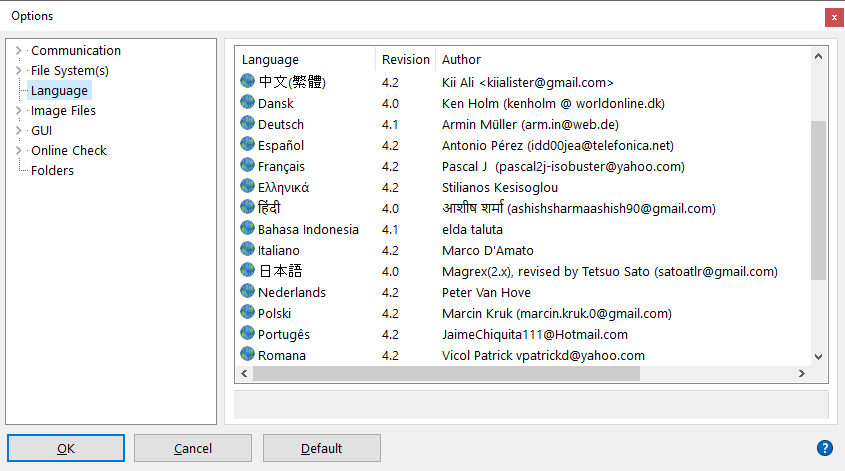
Dies wird mittels Sprachplugins oder DLLs ermöglicht.
Diese können in dem Installationsverzeichnis des IsoBusters im Unterordner "lang" gefunden werden.
Auswahl der Sprache:
Um die Sprache zu wechseln, muss diese nur ausgewählt und mit "OK" bestätigt werden (siehe Bild).
Ab diesem Zeitpunkt wird die gewählte Sprache verwendet.
Für einige Sprache wird nicht die zugehörige Flagge angezeigt. Der Grund dafür ist, dass Ihr System die zugehörigen Codeseiten nicht unterstützt.
z.B. unterstützen amerikanische Windowsversionen kein Japanisch
Standardmäßig werden neben der Japanischen Flagge Unterstriche "_" oder Fragezeichen "?" angezeigt.
Bei einer japanischen Windowsversion klappt dies jedoch einwandfrei und es werden daher japanische Zeichen angezeigt.
Dies sind Windowsbeschränkungen, nicht die von IsoBuster.
Suche nach einer Aktualisierung oder einer neuen Sprache:
Die neuesten Übersetzungen können auf der Website heruntergeladen werden.
Um eine Sprache zu aktualisieren, muss die Sprachdatei in Form eines DLL lediglich in den Ordner "lang" kopiert und ggf. überschrieben werden.
Falls eine Abfrage erscheint, muss diese dazu positiv bestätigt werden um die Datei zu überschreiben.
Wenn dies nicht funktioniert, wird diese Datei möglicherweise von einer laufenden Version von IsoBuster verwendet.
In diesem Fall muss IsoBuster geschlossen werden und der Vorgang wiederholt werden.
Für technikversierte:
Alle angezeigten Texte innerhalb IsoBuster benutzen die MS Windows Standardschrift "MS Sans Serif" und den Zeichensatz: DEFAULT_CHARSET um mit allen Sprachvarianten von Windows arbeiten zu können.
Für japanische Windowsversionen kann dies zu Problemen führen, da diese Version die Schriftart nicht korrekt auswählen kann.
Aus diesem Grunde wurde IsoBuster dahingehend erweitert, dass es automaitsch (ohne Benutzerinteraktion) den Zeichensatz ändert, falls ein Bedarf besteht.
Dies wird mittels der Sprachdateien (DLLs) durchgeführt und ist für den Benutzer nicht Relevant.
Die Personen hinter der Übersetzung:
Alle Übersetzungen wurden freundlicherweise von Muttersprachlern freiwillig durchgeführt.
Dies wurde unentgeltlich durchgeführt und diese Hilfe wird sehr gewürdigt.
Wenn Sie Teil dieser Gruppe oder ein Vertretungsübersetzer für eine Sprache werden wollen, senden Sie eine E-Mail an Translate@smart-projects.net.
Dort wird die Zusammenarbeit koordiniert, damit keine doppelte Arbeit durchgeführt wird.
Weitere Details finden Sie auf Website.
Dort folgen Sie dem Link "Sprache/Language" in der Sektion "IsoBuster".