How to Register PRO functionality
Registering IsoBuster to get a [Personal], [Professional] or [Enterprise] version is easy.
1. Order a key via Credit Card, Paypal, Bank Wire, Check, Cash, ... :
Click https://www.isobuster.com/buyisobusternow/ which will bring you to the Secure Online Pay site.
Once you have paid, an automated script will send you a Registration Email, Registration ID and Key within a few minutes. The confirmation Email will contain your payment confirmation and also (so scroll down) the registration Email, ID and Key, along with useful information (Location of next beta version, Help, ...). (Allow for a few hours delay in extremes but notify us https://www.isobuster.com/support.php when it takes more than 12 hours !)
2. Download and Install IsoBuster :
If you have not yet downloaded and installed IsoBuster, check out this section.
3. Once you have received the Registration ID and key via Email :
If you start IsoBuster for the very first time (after installation) you will get a registration dialog automatically:
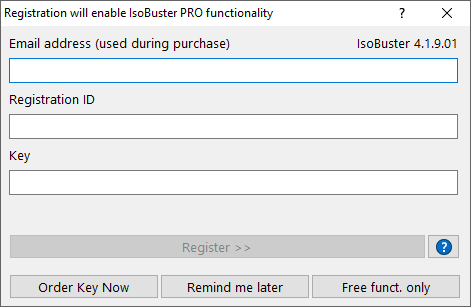
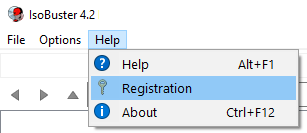
If you ran IsoBuster earlier and chose Free Functionality or Remind me later, Select "Registration" in the main menu ("Help" / "Registration"):
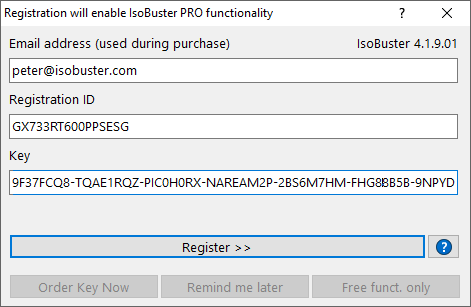
Type (or better yet copy and Paste from the registration mail) the Registration Email, ID and Key in the registration Dialog's Edit boxes.
Click the "Register >>" button which becomes active if the Email Address, ID and Key match and you will unlock paid for functionality. As of now, this version will stay unlocked on your system. Even after uninstalling and installing again, the version stays registered. If you update the program by installing a new version the program will still be registered ! Just over-install the new version.
4. In case of problems :
Problems Getting IsoBuster registered
5. Identify a registered version :
To find out if your version is properly registered or not, click the "About" option in the main menu : "Help" / "About". If the About windows says "[Registered]" then you have a registered version