IsoBuster 5.9 Beta Released!
IsoBuster 5.9 Beta, a release candidate for IsoBuster 5.9, is ready !
This version features a lot of cool functionality again. See below list for all the details:
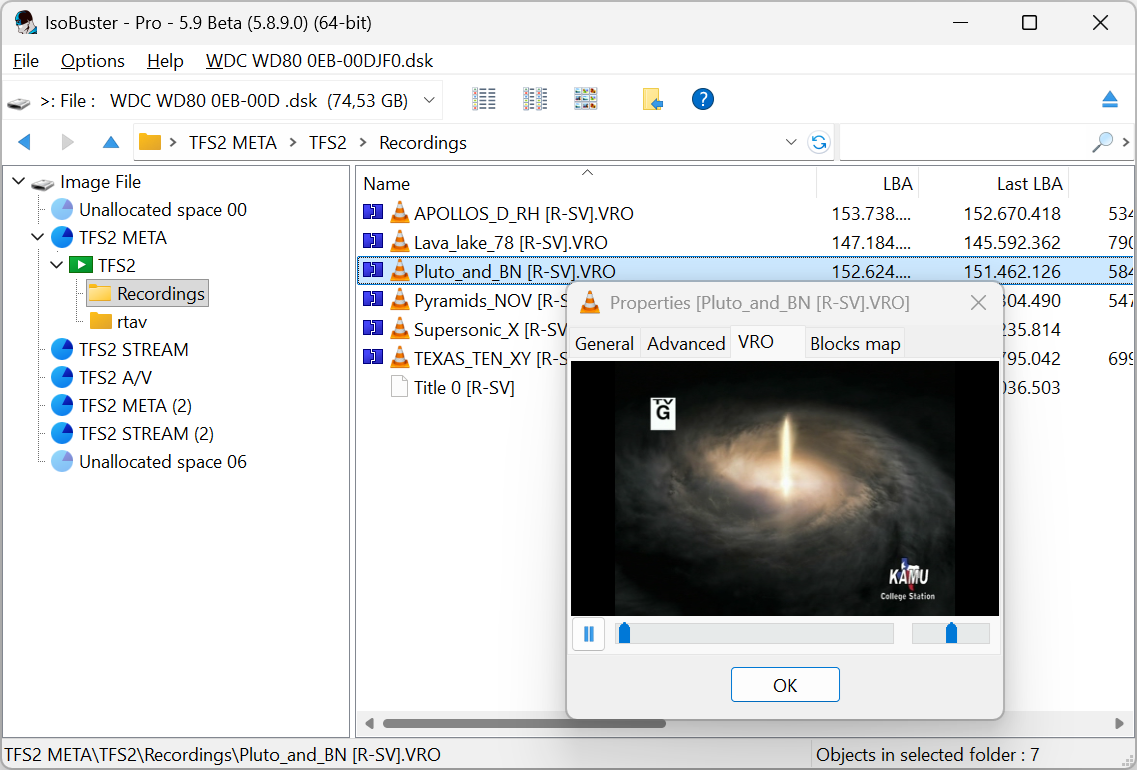
Several new DVR families were reverse engineered and are now also supported.
The work is not done. If you have a DVR that was previously not supported or that you can spot in below list, please try this beta and provide feedback. We're happy to work with you to improve the functionality before the final version is released.
Another interesting point of focus was improving IsoBuster for the blind and visually impaired. I hope we succeeded in that.
Please Install and Run this Beta version ! If there are any issues, now is the moment to report them. Don't wait until the final is out, which will be soon.
Let us know if you run into issues or have feedback
Changes / New:
- Support for playing CD-BGM, CD-ROM XA audio tracks (pure Mode 2 Form 2 ADPCM audio, e.g. in-flight audio discs)
- Support for Toshiba RD-VX47 & Funai HD-D2885 DVR HDDs
- Support for Philips DVDR3350H, DVDR3455H, Yamakawa DVR-665, Polaroid 2001G, Samsung HR 738 and probably a lot more based on the same chipset DVR HDDs
- Support for EasyFS, showing other media files besides recordings (e.g. *.mp3, photos, etc.) on Pioneer LX61D, LX70D and Sony RDR-HXD890 DVR HDDs
- Support for Philips DVDR-3300H, DVDR-3570H, DVDR-3590H and DVDR-5520H (HDM File system) DVR HDDs
- Support for the JVC SR-DVM700 DVR HDD file system
- Support for the Sony RDR-HX730, RDR-HXD760, .. DVR file system but be aware that recordings remain encrypted
- A scan for missing files and folders will now attempt to detect different *.VOB, *.VRO or *.M2TS recordings using the SCR/ATS clock instead of showing one big file
- Support for raw DVD and BD reading if the drive firmware supports it
- Support for raw DVD and BD image files, if detectable
- Support for raw-to-user-data reading across all functionality (instead of only during extraction of files), via a setting in Options
- Creation of a mini-dump file in case of a serious bug (Send it back to us for easy and fast issue resolution, 64bit only)
- Support for encrypted *.ISZ image files
- Support for *.ibscript files to facilitate breadcrumb commands and cli
Improvements:
- Improvements for the blind and visually impaired (64bit, Windows 8 and up):
- Ctrl+F9 puts focus on the drive selection list (combobox)
- Improved key navigation of the drive selection list
- Speak instead of Beep (Options / GUI / Beep)
- Popup dialog after extraction (or Cloning), default enabled in high contrast mode or when a screen-reader is active, otherwise needs to be enabled in options
- The text of a popup dialog is now automatically sent to a screen reader
- Ctrl+F11 sends a dialog's text to the screen reader
- Ctrl+Shift+F11 sends the dialog's text to the speech API, no screen-reader required
- Hovering over buttons and bread-crumbs sends their text to a screen-reader
- Improved Toshiba DVR formatting detection in case the HDD was previously formatted with NTFS (with a backup GPT at the end)
- Improved PREGAP and POSTGAP handling of CUE files that link to different files per track
- HFS and MFS can now also be assigned a code page (in options) to use during text conversion
- Properties of a GEMDOS FS show Bootable or not. Also introduced <%BOOTABLE> tag in reports
- Insert or fix a system header during filtering of mpeg, so that stricter mpg players (Mac (QuickTime) specifically) are happy as well
- Improvements detecting names for certain devices (when system drivers block Inquiry)
- Added cli support for /fs:al- (All file systems -minus- file systems that have a 'recovered' state)
- Added cli support for /ep:+cu,-cu,+md,-md (To force or suppress CUE and MD5 creation after making an image file)
- The cli /tree:? command can now also contain a *.ibtmpl file with the report string inside, instead of the string on the command line
- From now on, multiple image files can be loaded via the cli. The last one on the parameter list is the one that gets selected (and is worked on if other commands are present)
- cli /d: now accepts >, >0, >1, >2, .. to indicate the nth loaded image file, so that it can be used to complete an image file (/cl) or create a debug dump image file (/dump:) etc.
- Improved the report-template export dialog
- A middle mouse-button click or a left mouse-button click + Ctrl + Shift refreshes the blocks map view
- The password dialog now features an extra button that loads a *.pswrd text file with all your possible passwords to make life easy (this dialog only appears for encrypted Rimage volumes and encrypted *.isz image files)
- When the *.pswrd file-name matches the image file-name, it is used automatically
- Improved preview of encrypted files in a Rimage file-system
- The Vinyard *.mcg video stream is now split into its individual *.mcg recordings
- The managed image file engineering dialog can now also attempt to complete supposed reserved areas, for instance between sessions (Enterprise license)
- The managed image file engineering dialog now has the ability to complete an image 'Raw2User' when the selected drive for completion is capable of reading raw
- Plenty of other tweaks and improvements, lots of changes under the hood
Fixes:
- Fixed a crash while parsing GPT partitions in image files with a block size > 4096 (*.gcp images)
- Fixed sending too many taskbar updates to explorer during extraction, causing it to sometimes lock up
- Fixed a crash showing search results (via ctrl+R) when nothing had been searched yet
- Fixed a rare crash after selecting Properties on NTFS, found after a scan for missing files and folders
- Fixed a small cli /fs bug that under certain conditions caused the 'preferred' file system to be selected as well
- Fixed extracting files from the RImage file system
Known issues:
- None
Please tell people about it, like and share it on Facebook and/or X, post it on forums, reddit, etc. Practice safe and honest computing and stay away from cracks and keygens. Your help is appreciated.
Click to zoom