Starting with IsoBuster
Using IsoBuster is in fact easy. You just need to know a few things :
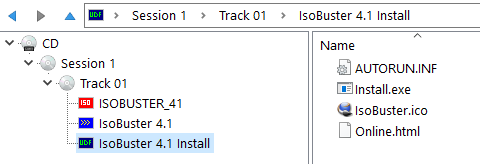
When you select a drive or an image file, the media will be scanned automatically. The Session, Track, Partition and File System content will be listed immediately.
If you don't see anything straight away, it means that IsoBuster could not detect anything or the device is still mounting the media.
In case of the latter, optical media, wait till the media is mounted properly by the drive. In most cases you can monitor this by looking at the LED behavior of your CD/DVD/BD/HD DVD drive. There are cases when the CD / DVD / BD / HD DVD reader will not mount media anymore because it is beyond recognition ! If the drive doesn't mount the media, IsoBuster will of course also not be able to access the media.
An examples of what you can see :
For more information on track and session layouts.
For more information on File Systems, what are they, why different but identical ones, ...
For more information on Image Files.